
A dummies guide to python
I understand. You’re tired. You just want to start programming in Python so you can start doing cool projects.
Well the good thing is that Python is a very intuitive language. Its actually the preferred language for data scientists (sorry R!). So I have assembled a quick guide for you to learn Python in a matter of minutes!
Python falls in the class of object-oriented languages. It has many great libraries for data science including pandas, numpy, sci-kit learn, matplotlib etc.
This aim of this guide is for you to get up to speed with Python so you hit the ground running.
We will be using Python 3 (the latest iteration)
For this lesson we wont be installing and IDE on our computer. We will use an online IDE to compile our code. For that please click HERE
First Program
#Open the IDE
#The first program for any programming language is “Hello World”

print ("Hello World")

# Execute

Hello World
Base Types
# Integer
# int 5 56 69 0

int = 5 56 69 0

# Float
# float 9.45 0.55

float = 9.45 0.55

# Boolean
# bool True False

# String
# str "One" "Ahsan"

str = "One" , "Ahsan"
Variables in Python
# Declaring a variable
# Whenever you use = you are assigning a value to some variable
#For example we use an integer

a = 1
print (a)

# Execute

1

# Re-assigning string to the same variable

a = "Ahsan"
print (a)

# Execute

Ahsan

#Concatenate Variables a & b

a = "Ahsan"
b = 1989

print (a+b)

# Execute

Traceback (most recent call last):
  File "python", line 4, in <module>
  TypeError: must be str, not int

# We got an error becasue we cannot add an integer & a string
# Hence we will convert integer to a string
# Use str function

print (a+str(b))

# Execute

Ahsan1989

# If we want to add a space between an integer and string
# Use " "

print (a+" "+str(b))

# Execute

Ahsan 1989

#Deleting a variable
# Delete b

del b

print (a+" "+str(b))

# Execute

Traceback (most recent call last):
  File "python", line 8, in <module>
  NameError: name 'b' is not defined

# b gets deleted hence the above NameError
Transforming Variables
#Accessing value in strings

a = "Ahsan"

print(a[0])

# Execute

A

# 0 is the first position in the variable
# Same can be done with multiple variables

a = "Ahsan"
b = "Will be teaching you python"
c = "How cool is that?"

print(a[0:5],b[0:20],c[0:8])

# Execute

Ahsan Will be teaching you How cool
Lists
# A list is a container type for storing different base types in Python

# also called an array

# List can be changed

list1 = [1, 2, 4]
list2 = ["Ahsan", "Anis", 1989]

# Accessing different values in a list

print(list1[1])

# Execute

2

print(list2[0:1])

# Execute

['Ahsan']
Tuples
# Tuples are like lists but are immutable meaning they cannot be changed

tuple1 = (1, 2, 4)
tuple2 = ("Ahsan", "Anis", 1989)

print(tuple2[0:1])

# Execute

('Ahsan',)
Dictionary
# Dictionary is an immutable data type such as strings, numbers, or tuples

dict = {'Name': 'Ahsan', 'Age': 28, 'Position': 'Data Scientist'}

print (dict['Name'], dict['Age'], dict['Position'])

# Execute

Ahsan 28 Data Scientist

# Can also be written like this

dict = {'Name': 'Ahsan', 'Age': 28, 'Position': 'Data Scientist'}

print ("dict['Name']: ", dict['Name'])

print ("dict['Age']: ", dict['Age'])

print("dict['Position']:", dict['Position'])

# Execute

dict['Name']:  Ahsan
dict['Age']:  28
dict['Position']: Data Scientist
Arrays
# An array is a 1 dimensional data structure also known as a scalar

arr = [100, 200, 300, 400, 500]

print (arr[1:4])

# Execute

[200, 300, 400]
Matrix
# A  A matrix is a 2 dimensional data structure

matrix = [['Ahsan',8,8,8,8,8],
         ['Anis',9,9,9,9,9],
         ['Data',0,0,0,0,0],
         ['Scientist',1,1,1,1,1]]

print (matrix)

# Execute

[['Ahsan', 8, 8, 8, 8, 8], ['Anis', 9, 9, 9, 9, 9], ['Data', 0, 0, 0, 0, 0], ['Scientist', 1, 1, 1, 1, 1]]
Arithmetic Operators
# Addition

a =  100
b = 10

print (a+b)

# Execute

110

# Subtraction a-b = 90
# Multiplication  a * b = 1000
# Division a / b = 10
# Modulus a % b = 0 , b % a = 10
# Exponent a**b = 100000000000000000000
If statement
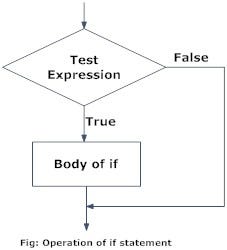
# If statetemnt is a boolean expression followed by one or more statements
# Boolean statement are either True or False

a = 100
if a > = 10:
     print ("Thats a big number")

# Execute

Thats a big number
If…Else statement
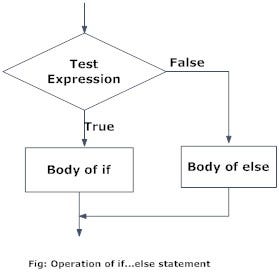
#If statement runs like usual, Else statement run if the first statement is False

a = 9
if a >= 10:
     print ("Thats a big number")
else:
    print ("Not a big number")

# Execute

Not a big number
Elif statement
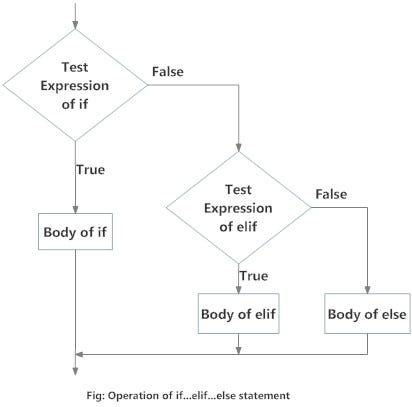
# Elif statement is a statement which you put after if statement

a = 1
if a > 0:
     print ("Thats a big number")
elif a == 0:
    print ("Not a big number")
else:
    print ("Put another number")

# Execute

Thats a big number

a = 0
if a > 0:
     print ("Thats a big number")
elif a == 0:
    print ("Not a big number")
else:
    print ("Put another number")

# Execute

Not a big number

a = -2
if a > 0:
     print ("Thats a big number")
elif a == 0:
    print ("Not a big number")
else:
    print ("Put another number")

# Execute

Put another number
Nested if statements
# An if, else, elif statement within an if, else, elif statement is called a nested if statement

num = float(input("Enter a number: "))
if num >= 0:
    if num == 0:
        print("Zero")
    else:
        print("Positive number")
else:
    print("Negative number")
For Loop
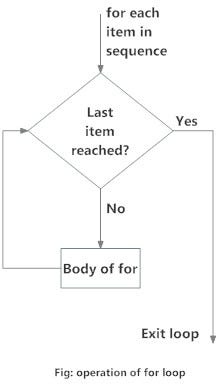
# a for loop executes till the last statement is reached

numbers = [1, 2, 2, 8, 4]

sum = 0

for val in numbers:
 sum = sum+val

print("The sum is", sum)

# Execute

('The sum is', 17)
For loop with else
# Exactly like for loop, just that the else statement is printed at the end

numbers = [1, 2, 3, 4, 5 , 6, 7, 8, 9, 10]

for i in numbers:
    print(i)
else:
    print("All numbers printed.")

# Execute

1
2
3
4
5
6
7
8
9
10
All numbers printed.
While loop
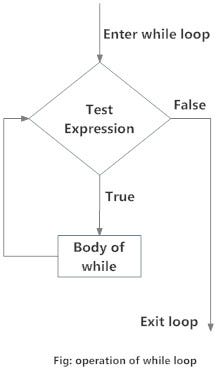
# a while loop iterates the statement as long as the statement is True

number = 0
while (number <= 10):
   print 'The count is:', number
   number = number + 1

print "All numbers printed"

# Execute

The count is: 0
The count is: 1
The count is: 2
The count is: 3
The count is: 4
The count is: 5
The count is: 6
The count is: 7
The count is: 8
The count is: 9
The count is: 10
All numbers printed
While loop with else
# Same as while loop, else statement is executed when logic is false

counter = 0

while counter <= 10:
    print("loop")
    counter = counter + 1
else:
    print("end loop")

# Execute

loop
loop
loop
loop
loop
loop
loop
loop
loop
loop
loop
end loop
Break statement
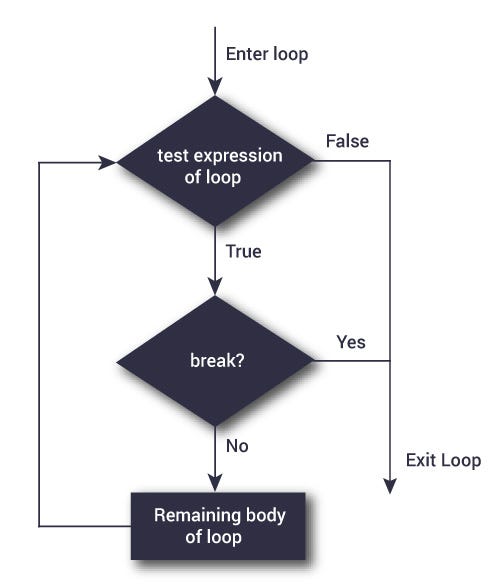
# Break statement is used to stop the loop in its tracks

for val in "Ahsan":
    if val == "n":
        break
    print(val)

print("loop end")

# Execute

A
h
s
a
loop end
Continue statement
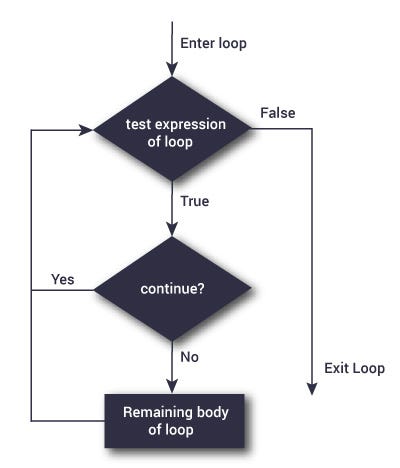
# Continue statement unlike break continues to print the statement till it finishes

for val in "Ahsan":
    if val == "a":
        continue
    print(val)

print("loop end")

# Execute

A
h
s
n
loop end
 Good Python